![Move4U.png]](https://support.move4u.com/hs-fs/hubfs/Move4U.png?height=30&name=Move4U.png)
To create a container
Go to the fourth tab in the inventory section, labeled "Container", and click on "Create Container."
In this section, you can enter details such as:
- The seal number
- The container number (required)
- Photos of the container when empty, half full, and full
- Ownership
- Additional information like length, width, weight, and comments
Note: You can also create a container directly from the "Pieces" section by selecting a piece and adding it to a new container from there
Adding Pieces to a Container
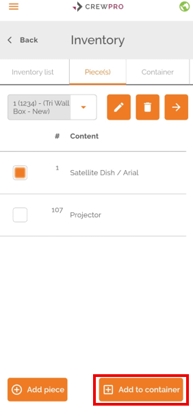
Once the container is created, go to the "Pieces" section and select the pieces that should go inside it. To do this, use the dropdown at the top of the screen to select the piece, then click on "Add to Container" located at the bottom right corner of the screen.
If you have any questions or doubts, please don't hesitate to reach out to your support team. Email to support@move4u.com, submit a ticket, start a chat or
dial +31 97 010 257 939 (EU) +1 206 222 1851 (US)