![Move4U.png]](https://support.move4u.com/hs-fs/hubfs/Move4U.png?height=30&name=Move4U.png)
To make the application automatically calculate the volume and weight of items based on their L x W x H dimensions, you need to enable a setting first.
Follow these steps:
Step 1: Enable the Crate Dimensions Option
- Open the CrewPro application.
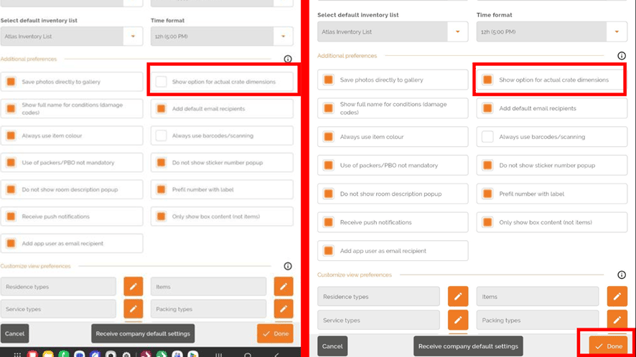
- Go to Settings.
- Scroll down to the Additional Preferences section.
- Find the option Show option for actual crate dimensions.
- Enable this option.
- Press Done to save the changes.
Step 2: Add Item Dimensions
- Open the item you want to edit or add a new item.
- Go to the Packing Details section.
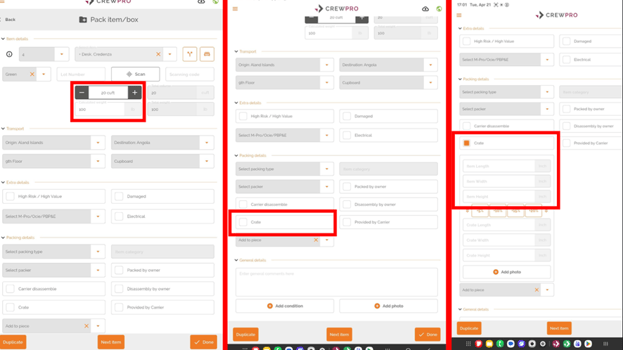
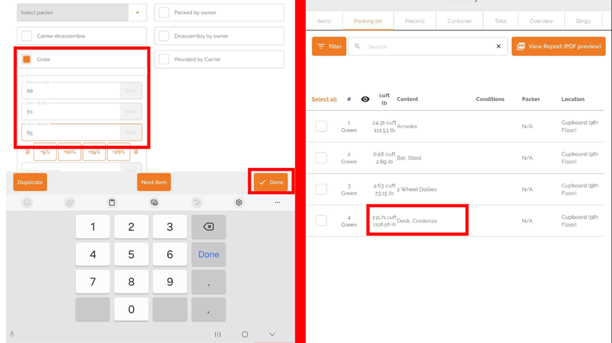
- In the packing type, select Crate to activate the dimension fields and enter the item measurements: Length, Width and Height
- After entering the dimensions, press one of the save buttons.
- Once saved, the system will automatically calculate and update the item's volume and weight based on the dimensions entered. This ensures more accurate inventory and shipping information.