![Move4U.png]](https://support.move4u.com/hs-fs/hubfs/Move4U.png?height=30&name=Move4U.png)
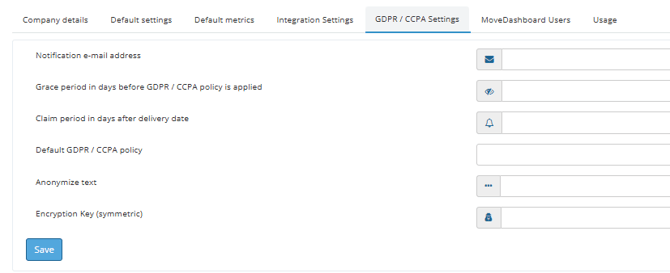
To open the settings:
- Log in to MoveDashboard.
- Go to your company settings (the page with the Company details, Default settings and Usage tabs).
- Click the GDPR / CCPA Settings tab.
- Fill in the fields as described below and click Save.
How the timing works
Personal data stays available until both the claim period and the grace period are over. Only then is your default policy applied.
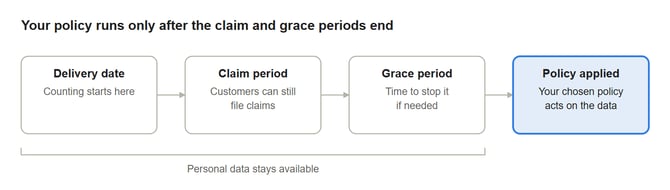
Both periods are counted in days. Before data is deleted or anonymized, an alert goes to the notification e-mail address.
What to fill in per field
1. Notification e-mail address
The address that receives GDPR / CCPA alerts, for example before data is deleted or anonymized.
- What to enter: an e-mail address your team checks.
- Example: privacy@yourcompany.com
- Tip: use a shared mailbox (like privacy@ or office@) so alerts still arrive when someone is on holiday or leaves the company.
2. Grace period in days before GDPR / CCPA policy is applied
How many days the system waits before it applies your policy to a move's personal data. It gives you a buffer to stop anything that shouldn't be touched yet.
- What to enter: a number of days.
- Example: 30
- Tip: pick a period long enough for your team to act on the alert e-mail.
3. Claim period in days after delivery date
How many days after the delivery date a customer can still file a claim. Personal data stays available during this time so your team can handle claims.
- What to enter: a number of days, counted from the delivery date.
- Example: 90
- Tip: match this to the claim period in your own terms and conditions. If your terms give customers three months to claim, enter at least 90.
4. Default GDPR / CCPA policy
What happens to personal data once the claim period and grace period are over.
- What to enter: pick one option from the list: Undefined (blank), Soft Delete, Hard Delete, Encryption (symmetric), Encryption (asymmetric) or Anonymize. The next section compares them.
- Tip: if you leave this blank, personal data is kept with no end date. Check that this matches your own privacy policy.
5. Anonymize text
The text that replaces personal data when the policy is Anonymize.
- What to enter: a short label.
- Example: Anonymized
- Only needed when the Default GDPR / CCPA policy is Anonymize.
6. Encryption Key (symmetric)
The secret key used to lock and unlock personal data when the policy is Encryption (symmetric).
- What to enter: your own secret key.
- Only needed when the Default GDPR / CCPA policy is Encryption (symmetric).
- Important: if the key is lost or changed, data encrypted with it can't be recovered. Keep a copy somewhere safe outside MoveDashboard, such as your company's password manager, and don't change the key once data has been encrypted.
Choosing a default policy
Pick the policy that matches your own privacy policy. The main question is whether you might ever need the data back.
|
Policy |
What happens to personal data |
Can it be undone? |
Field it uses |
|---|---|---|---|
|
Undefined / blank |
Nothing. Data is kept with no end date. |
Nothing to undo |
None |
|
Soft Delete |
Marked as deleted and hidden, but still stored. |
Yes, it can be restored |
None |
|
Hard Delete |
Removed for good, including from archives. |
No |
None |
|
Encryption (symmetric) |
Locked with your key and shown as [encrypted]. |
Yes, with the same key |
Encryption Key (symmetric) |
|
Encryption (asymmetric) |
Locked with one key of a key pair. Only the second key can unlock it, and that key is kept offline and released only through a formal procedure. |
Yes, with the unlock key |
None on this screen |
|
Anonymize |
Names, addresses, e-mail addresses and phone numbers are replaced with your Anonymize text. Move records stay for reporting. |
No |
Anonymize text |
Hard Delete and Anonymize can't be reversed, so check your claim and grace periods before you choose either one.
Example setup
The values below are an example. Use the periods from your own terms and conditions.
|
Field |
Example value |
|---|---|
|
Notification e-mail address |
privacy@yourcompany.com |
|
Grace period in days |
30 |
|
Claim period in days after delivery date |
90 |
|
Default GDPR / CCPA policy |
Anonymize |
|
Anonymize text |
Anonymized |
|
Encryption Key (symmetric) |
Leave empty (not used with Anonymize) |
With these values, a move delivered on 1 March keeps its personal data through the 90-day claim period (until 30 May) and the 30-day grace period (until 29 June). After that, names, addresses and contact details are replaced with "Anonymized".
Before you click Save
- The claim period matches your terms and conditions.
- The notification address is a shared mailbox that someone reads.
- If you chose Anonymize, the Anonymize text is filled in.
- If you chose Encryption (symmetric), the key is filled in and a copy is stored safely.
- If you chose Hard Delete or Anonymize, your team knows the data can't be brought back.
Good to know
What happens if I leave the policy blank? No policy is applied, so personal data is kept with no end date.
Can I get data back after a Soft Delete? Yes. Soft-deleted data is hidden but still stored, so it can be restored.
What happens to survey videos? Survey videos are made inaccessible on request, but they are kept for at least the claim period so claims can still be handled.
Can I check the GDPR status of a move? If you work with an integration, you can request the status of a move through the API using the dossier number or your own external reference. Requests are processed in the background, in this order: request received, grace period active, marked for processing, being processed, processed.
What if I change the Encryption Key? Data that was already encrypted with the old key can't be unlocked with the new one. Only change the key if you are sure no data depends on the old one.
If you have any questions or doubts, please don’t hesitate to reach out to our support team